

Can ChatGPT or Claude Trade Crypto for You? How Exchanges Let AI In, and What We Found in 27 AI Trading Tools
Short answer: Yes. Between February and October 2026, Binance, Bybit, OKX, Bitget, Coinbase, Kraken and Crypto.com all opened a way for AI to trade on your account. You can use the exchange's own AI assistant or connect your own ChatGPT or Claude through API keys or an MCP server. Most of the risk sits in the permissions you grant: whether the AI can trade, move funds or withdraw.
This guide is for spot and futures traders who want to use ChatGPT or Claude for crypto trading safely. It includes our own audit of 27 tools that connect AI to an exchange account, done on October 23, 2026.
Which crypto exchanges let AI trade in 2026?
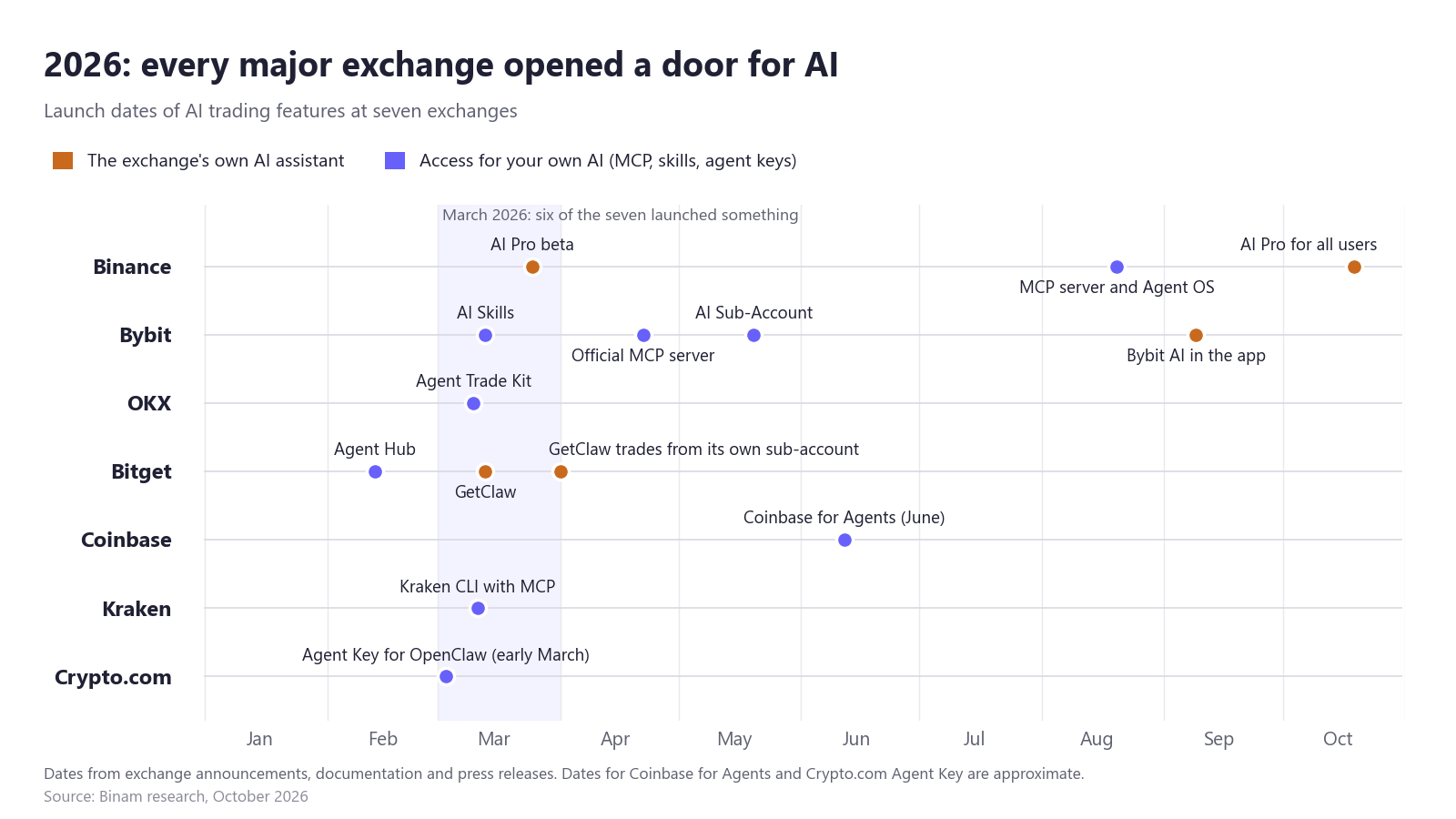
Every major exchange we checked launched a way for AI to trade in 2026, and six of the seven shipped something in March.
| Exchange | What launched in 2026 | Source |
|---|---|---|
| Binance | AI Pro beta, March 25; official MCP server and Agent OS, August 20; AI Pro for all users, October 19 | Binance docs, release |
| Bybit | AI Skills, March 13; official MCP server, April 22; AI Sub-Account, May 20; Bybit AI chat in the app, September 9 | GitHub, release, TradeInformer |
| OKX | Agent Trade Kit, an MCP server and command-line tool, March 10 | GitHub |
| Bitget | Agent Hub for outside agents, February 13; its own agent GetClaw, March 13; a trading sub-account for GetClaw, April 1 | GitHub, TradeInformer |
| Coinbase | Coinbase for Agents, around June | Coinbase docs, MediaNama |
| Kraken | Kraken CLI with a built-in MCP server, March 11 | Kraken blog |
| Crypto.com | Agent Key for the OpenClaw agent, early March | Blockonomi |
Gemini added agentic trading through MCP on April 27 (Decrypt).
How do ChatGPT and Claude connect to Binance, Bybit and other exchanges?
AI reaches your account in one of two ways: through an assistant built into the exchange app, or through your own ChatGPT, Claude or other agent connected with API keys or an MCP server.
The exchange's own AI assistant
In Binance AI Pro you describe a trading idea in plain words, review the strategy it builds, test it on paper and approve it separately. Live strategies run in a virtual sub-account isolated from your main account, and only you can fund it (release). Binance says the AI's API key "has no withdrawal or transfer permissions" (Binance Learn).
Bybit AI is a chat in the Bybit app that trades from a separate Bybit AI sub-account and needs no API key. Bybit has not disclosed the model or the price (TradeInformer). Bitget's GetClaw has its own sub-account and, according to Bitget's release, can "place and manage live trades autonomously" without approval at each step (TradeInformer). We found no public description of its limits or withdrawal rules.
Your own ChatGPT or Claude
Exchanges offer three kinds of connection:
- A remote MCP server with browser sign-in. You add the server address to Claude or ChatGPT and approve access on the exchange's consent screen. No key sits on your computer. Binance and Coinbase work this way.
- A local MCP server or command-line tool that runs on your computer and reads your API key from environment variables or a config file. Bybit, OKX, Kraken and Bitget work this way.
- Skills: instruction files with scripts that an agent such as Claude Code or OpenClaw runs itself. Binance, Bybit, OKX and Crypto.com publish them on GitHub.
In Claude, you add a remote server under Customize > Connectors > Add custom connector and then sign in on the exchange's site (Anthropic). For Binance the address is https://agent.binance.com/mcp/agentic (Binance). ChatGPT adds custom MCP servers through developer mode, which OpenAI called "powerful but dangerous" at its launch in September 2025 (VentureBeat).
What is an MCP server for crypto?
An MCP server for crypto is a small program that lets an AI chat use an exchange account through a fixed list of tools, such as "get price", "show balance" or "place order". MCP, the Model Context Protocol, is an open standard that Anthropic introduced in late 2024 and handed to the Linux Foundation's Agentic AI Foundation in December 2025; ChatGPT, Gemini, Cursor and VS Code support it (Anthropic).
A chat model on its own only writes text. The server gives it the tools, the model picks one, and the server sends the real request to the exchange with your permissions. Whatever the server can do with your key, the AI can do too, including by mistake.
What can an AI assistant do for a crypto trader?
An AI assistant helps with research and routine work around a trade. So far nothing shows that it gives you an edge.
It does these jobs well:
- Market questions with live data, such as price, funding or the order book.
- Screening and alerts.
- Journaling and trade review through a read-only key.
- Risk checks on an open position and order drafts that you confirm yourself.
In a MEXC survey of 3,708 traders, 84.8% had used AI in the previous six months; the top uses were news summaries (54.3%) and market analysis (48.6%), and only 7.6% named direct trade execution (Chainwire, Oct 15, 2026). The survey was commissioned by an exchange that sells AI tools.
Trading decisions are where the models fall short. In Alpha Arena, six AI models traded $10,000 of real money each on crypto futures. When we replayed their account histories against Binam's challenge rules, all six broke the daily loss limit within about 50 hours (our replay). Binance's own MCP documentation warns that AI "can make mistakes, act on outdated or hallucinated information, or send incorrect parameters" (Binance).
Are AI trading tools for crypto exchanges safe? We audited 27
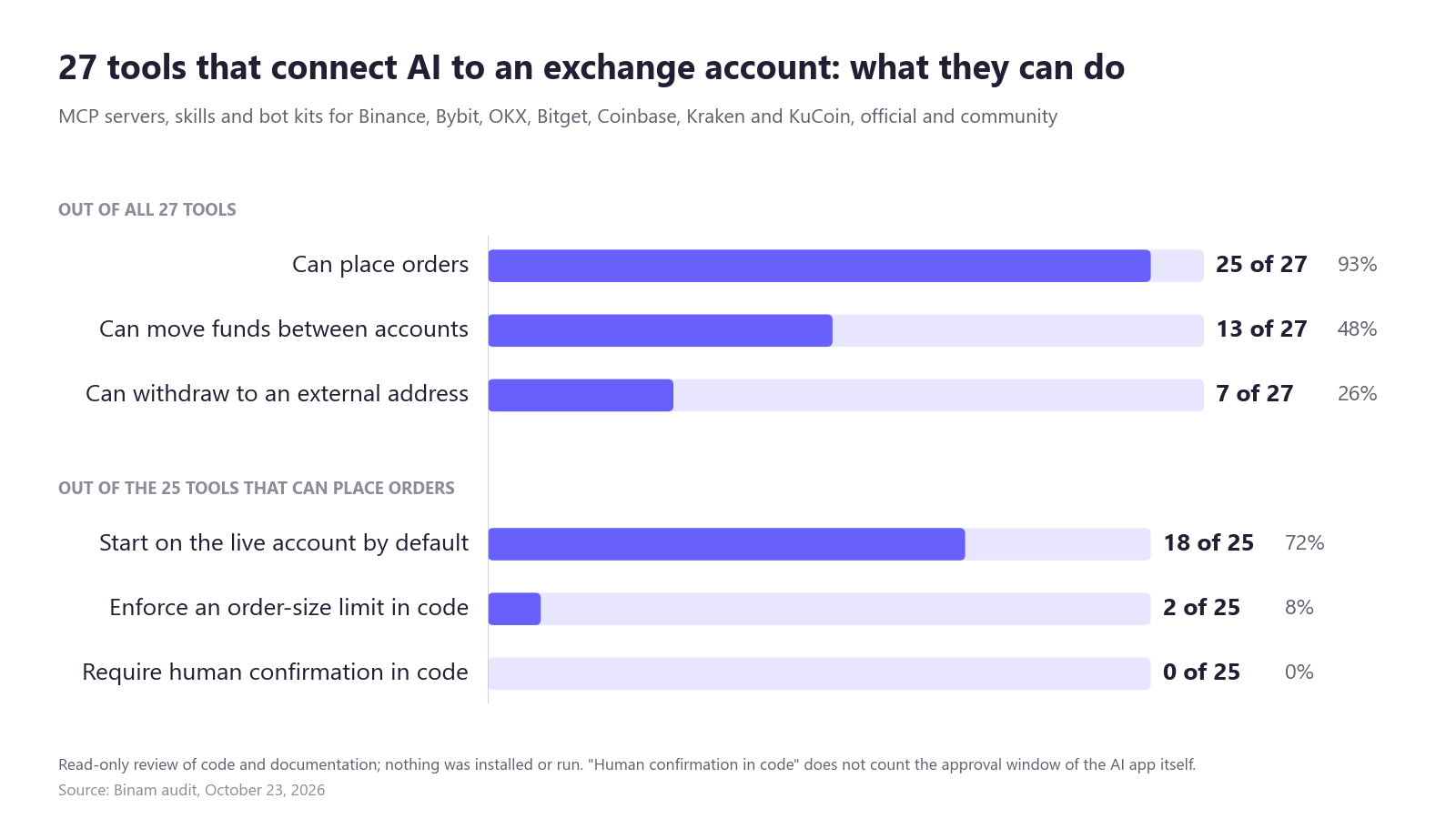
Most of them leave safety to you. Of the 27 tools we checked, 25 can place orders, 18 of those start on the live account by default, and none makes a person confirm a trade in its own code.
On October 23, 2026 we reviewed 19 local MCP servers, 4 hosted MCP services, 3 skills and 1 bot kit: 9 from exchanges and 18 from the community. We took the most-starred GitHub results for searches such as "Binance MCP", every official tool we found, and tools listed in the glama.ai, mcp.so and mcpservers.org catalogs and on npm, leaving out tools that only show public prices. We read README files, source code, GitHub and npm data and exchange documentation, and installed nothing. A tool counts as asking for confirmation only if its own code makes a person approve the action. The "allow this tool?" window in Claude or ChatGPT does not count: every tool gets it, and users can set it to "Allow always".
What we found:
- 25 of 27 can place orders. The exceptions are an archived read-only Bybit server and KuCoin's official skills.
- 13 of 27 can move funds between accounts, and 7 of 27 have a tool that withdraws to an external address. Three of the seven are official: Bitget's MCP server, Kraken CLI and Binance's skill. Only Kraken keeps the withdrawal tool off by default. A withdrawal still needs a key with that right.
- 18 of the 25 trading tools start live by default. Four start on testnet or paper trading, and one ships with trading switched off.
- 2 of 25 enforce an order-size limit in code: a community Bybit server capped at 100 USDT per order and a Bitget bot kit capped at $100 per trade and three trades a day.
- 0 of 25 require human confirmation in code. What exists instead is a flag the model can set itself (Kraken, Bitget) or an instruction in a skill (Binance, OKX). Binance's hosted server says the agent asks first but does not show how this is enforced.
- 8 of 9 official tools were updated in the last 90 days, against 5 of 18 community projects.
Red flags we found
Each of these shows something to check before you install a tool (findings as of October 23, 2026).
- A withdrawal tool the README does not mention. TermiX-official/binance-mcp has 97 stars, the second most among "Binance MCP" results. Despite "official" in the account name, it is not from Binance. The README lists five tools, while the code registers 15 modules, including a wallet module with a withdrawal function that runs without confirmation. It was last updated on April 16, 2025, and the README asks for a BSC wallet private key that no tool uses.
- An unofficial copy of OKX's kit. dex-original/okx-agent-trade-kit sits outside OKX's GitHub organization, yet its README presents it as the product without saying it is a copy. It has 2,300 forks and 111 stars and offers a one-line
curl ... | bashinstall from that account. We found no malicious code in the current scripts, but they add the server to every AI app they find without asking, and the owner can change them at any time. The official kit is okx/agent-trade-kit. - Keys pasted into a chat. Binance's own skill handles users who send API keys in the chat, KuCoin's skills ask you to hand the agent a file with your keys, and the archived Hummingbot MCP passes exchange keys as tool arguments. In each case the key becomes part of a conversation that the AI provider processes.
- A loss limit we found in the README but not in the code. lazy-dinosaur/ccxt-mcp (95 stars) advertises daily and weekly loss limits. We did not find those checks in its order and server code, and its sample prompt tells the agent to use "the entire available capital" when no amount is given.
The safest community design we read was dlwjdtn535/mcp-bybit-server: trading is off by default, and the code checks a 100 USDT cap on every order.
We read README files and the main source files, not every line of code, and judged hosted services with closed code by their documentation.
How do exchanges limit what an AI can do?
The safer setups share one design: a separate sub-account that you fund yourself, no right to withdraw, and a person who approves each trade.
| Exchange | Separate account for the AI | Can the AI withdraw? | IP whitelist rules | Demo or testnet | Caps |
|---|---|---|---|---|---|
| Binance | Agentic sub-account (MCP), AI Strategy Account (AI Pro); start empty, only you fund them (docs) | No: "There is no withdrawal scope" | Withdrawal rights need an IP restriction; system HMAC keys without one only read (FAQ) | Demo Mode, demo-api.binance.com (docs) | Loss limited to the sub-account balance; emergency stop |
| Bybit | AI Sub-Account, API only (release) | Sub-account keys have no Withdraw right (API docs) | Keys with no IP stop working after 90 days | Demo Trading, api-demo.bybit.com (docs) | Owner sets asset, transfer and leverage limits |
| OKX | Recommended on OKX's kit page | No tool in the kit; keys can carry Withdraw, so leave it off | Trade or withdraw keys with no IP expire after 14 idle days (OKX, 2023) | Demo profile; live is the default (GitHub) | None; read-only mode |
| Coinbase | Agent portfolio, spot only (docs) | No: only between your portfolios | Not covered | None mentioned | Per-request max_amount only |
| Kraken | Not described | Yes, with the funding service on (docs) | Not covered | Paper trading by default | Docs advise position limits and pair allowlists on the key |
| Bitget | Agentic account: a fund pool separate from your main balance; GetClaw has its own sub-account (docs) | Agentic account: no, it "excludes withdrawals entirely". With a manual key the official server has a withdraw tool in its default module (GitHub), so the key's rights decide | Not described in sources we could open | --paper-trading with a demo key, off by default | None described |
| Crypto.com | Agent Key with a weekly budget (Blockonomi) | Agent Key: blocked; Exchange skill: to pre-approved addresses (GitHub) | Exchange keys can be IP-restricted | Not described | $1,000 to $20,000 a week (help) |
Some setups that look safe have gaps:
- Coinbase isolates the agent's portfolio for spot only, so futures trade from the default portfolio. It also warns that "an instruction to the agent is not a server-enforced session spending limit", and its
max_amountcaps a single request. - Kraken's CLI starts read-only, but once you add the
fundingservice the agent can start a withdrawal. - Crypto.com's App skill cannot withdraw, while its Exchange skill can send funds to addresses pre-approved in your settings.
- Bybit's skill asks you to paste your key into the chat when you run it in ChatGPT or Gemini (GitHub).
- Claude's "Allow always" setting removes the approval step, and Anthropic recommends it only "when using a server and tool that you trust to run unsupervised" (Anthropic).
What can go wrong? AI and crypto incidents in 2025 and 2026
The losses on record came from stolen access, poisoned plugins and agents that obeyed text they should not have trusted. As of October 23, 2026 we found no documented case of ChatGPT or Claude placing a wrong order through an exchange's official MCP server.
- Grok and Bankrbot, May 4, 2026. An attacker posted a message in Morse code on X; Grok translated it and addressed it to Bankrbot, which sent about 3 billion DRB tokens from a wallet on Base. The OECD AI Incidents Monitor estimates the loss at about $155,000 to $180,000 and says the attack "relied on how the AI interpreted user input, not on smart contract vulnerabilities" (OECD).
- Bankr, May 2026. Bankr paused swaps and transfers after an attacker got into 14 of its wallets and promised to reimburse the losses; we found no published cause (Cointelegraph).
- Malicious skills, February 2026. SlowMist flagged 472 malicious skills in ClawHub, the marketplace for the OpenClaw agent. Crypto and finance names served as lures, and the skills hid a backdoor that could collect passwords and files (Cointelegraph). Binance AI Pro's beta (Zawya) and Bitget's GetClaw (ITBrief) are built on OpenClaw, and Crypto.com's Agent Key connects to it.
- Exposed OpenClaw servers, February 2026. According to Techzine, SecurityScorecard counted 40,214 OpenClaw instances open to the internet, and 12,812 IP addresses, about 45% of those checked, were open to remote code execution. Access to an instance means access to the API keys and tokens stored in it (Techzine).
- Lobstar Wilde, February 2026. An experimental trading agent was jokingly asked for 4 SOL, about $310, and sent 52.4 million LOBSTAR tokens, roughly 5% of the supply. The recipient sold them for about $40,000; the author blamed the agent losing its conversation state after a crash (BlockEden).
- SwissBorg and Kiln, September 8, 2025. About 193,000 SOL, then about $41 million, left SwissBorg's Solana Earn program through a compromised API at its staking partner Kiln. SwissBorg covered the loss, and its CEO said: "This was not a hack of SwissBorg itself" (Cointelegraph). Kiln confirmed only "a potential compromise in our infrastructure" (Kiln). This was a partner's API, and no trader's key leaked, but any service with API access to your funds, an AI connector included, carries the same kind of risk.
- Leaked keys. In the 2022 3Commas case, about 100,000 exchange API keys leaked and attackers traded through them on illiquid pairs; loss estimates run from over $6 million to at least $20 million (Cointelegraph). Keys also leak through code: according to GitGuardian, commits co-written with Claude Code leaked secrets at a rate of 3.2%, against a 1.5% baseline (GitGuardian).
How do I connect an AI to my exchange safely?
Give the AI the smallest account and the fewest rights that do the job, and keep a person approving every trade:
- Decide whether the AI only needs to read. Market questions and trade reviews need a read-only key. OKX's kit has a
--read-onlymode, and Kraken's CLI starts read-only. - Use a sub-account that holds only what you can afford to lose: Binance's Agentic sub-account, which the agent cannot fund from your main account; Bybit's AI Sub-Account with asset and leverage caps; a separate Coinbase portfolio, which isolates spot only.
- Turn off withdrawals and transfers. Bybit recommends a "Read + Trade" key and never Withdraw (GitHub). On Kraken, leave
fundingoff. Bitget's server ships with a withdraw tool, so either use Bitget's Agentic account, which excludes withdrawals, or make sure the key itself has no such right. - Bind the key to your IP address. Binance gives withdrawal rights only to IP-restricted keys; Bybit disables unbound keys after 90 days, and OKX expires unbound trading keys after 14 idle days. Browser sign-in on Binance and Coinbase keeps the key off your computer.
- Start on demo and check that demo is really on:
demo-api.binance.com,api-demo.bybit.com, OKX's demo profile, Bitget's--paper-trading. Bybit's official server trades live unless you setBYBIT_TESTNET=true. - Never paste keys into a chat. Use browser sign-in or environment variables on your own machine, and keep key files out of code repositories.
- Install only official or audited tools. Take the link from the exchange's documentation, check the GitHub organization (binance, bybit-exchange, okx, krakenfx, Bitget-AI) and the last update, and skip
curl | bashinstalls from unknown accounts. - Set size limits outside the model. Only 2 of 25 tools had one. Use the exchange's caps where they exist, such as Bybit's AI Sub-Account limits or Crypto.com's weekly budget. In your own code, let the model propose a trade and the code set its size, as in our AI agent replay.
- Keep human confirmation on. Leave Claude's tool permission on "Needs approval" for anything that trades. Do not let a trading agent act on posts or messages from strangers; the Bankrbot loss started with a post on X.
- Review the logs and know the off switch. OKX's kit logs to
~/.okx/logs/. Binance's emergency stop under Profile > Dashboard > Sub-account > Account Management disconnects all agents and cancels orders and positions in the Agentic account. Coinbase revokes access under Security > Connections and warns that "deleting a local skill or clearing a chat is not the same as revoking access".
Frequently asked questions
Can ChatGPT be used to trade cryptocurrency?
Yes, through an exchange's MCP server added as a custom connector, for example Binance's Agentic sub-account or Coinbase for Agents. Coinbase's docs note that ChatGPT creates an order in one turn, while Claude shows a preview and asks first.
Can I use Claude for crypto trading?
Yes. Claude connects to Binance and Coinbase through remote connectors with browser sign-in, and Claude Code also runs the local servers from Bybit, OKX, Kraken and Bitget. Claude asks before each tool call unless you choose "Allow always", so keep the approval on for trading tools and start on demo.
How do I connect ChatGPT or Claude to Binance or Bybit?
For Binance, add https://agent.binance.com/mcp/agentic as a custom connector, sign in on Binance and choose the scopes; trades then happen in a separate Agentic sub-account. For Bybit, run the official trading-mcp server with a Read + Trade key in environment variables, ideally on an AI Sub-Account, and set BYBIT_TESTNET=true for the first tests.
Is it safe to give AI my API key?
Only with tight limits: a sub-account with a small balance, no withdrawal or transfer rights, an IP whitelist, and a key that never appears in a chat. Tools that read only public data, such as Binam's free screener, need no key at all.
What can hackers do with my API key?
That depends on its rights. A read-only key exposes balances and history. A trading key can be abused without a withdrawal: in the 2022 3Commas leak, attackers traded victims' accounts on illiquid pairs, with losses estimated at $6 million to $20 million or more. A key with withdrawal rights can empty the account, which is why Binance requires an IP restriction for it.
What is Binance AI Pro?
It is Binance's built-in AI assistant that turns a trading idea in plain words into an automated strategy for spot and USDⓈ-M futures (DailyCoin). You test it on paper, approve it separately, and it trades in an isolated sub-account that you fund. It opened to all users on October 19, 2026. Unite.AI reports a free plan and a 19.99 USDC monthly plan; Binance's release lists no prices.
What is an MCP server for crypto?
It is a connector that gives an AI chat a list of exchange tools, such as checking a price or placing an order, and sends the requests with your permissions. Binance, Bybit, OKX, Bitget, Coinbase and Kraken have official servers.
Where to start
Start with tasks that cannot touch your money. Binam's free crypto screener shows order-book walls, funding rates and a live market map for Binance, Bybit and OKX without sign-up or API keys, and our guide to order-book walls explains how to read them. Before you let an agent trade, read our replay of six AI models against prop challenge rules. Binam, a crypto prop trading firm, allows bots and algorithmic strategies in its challenge rules as long as the risk rules are respected.
Trading crypto involves risk. This article is for information only and is not investment advice.