

Binance Prop Firm Challenge: How to Trade It in CScalp, Step by Step
Short answer: Binance does not run a prop program; funded accounts come from prop firms. At Binam you can choose Binance as the exchange for your challenge and trade it in the CScalp terminal: the demo account is created automatically, you receive a login and password, and you trade Binance futures through CScalp's order book ladder. Below is how it works, how to size positions so the rules hold, and the mistakes that end most scalping challenges.
Does Binance have a prop firm or funded accounts?
No. Binance offers practice tools, such as Demo Trading with virtual balances, but it does not fund traders. Funding comes from a prop firm that evaluates you and then gives you its capital.
Most crypto prop firms do not let you trade on Binance at all. They connect to Bybit through API keys, run their own platforms or use MT5. HyroTrader, for example, states plainly that it does not connect to Binance and uses Binance only as a price source (HyroTrader). One more trap in search results: lists of "Binance prop firms" often mean firms where you can pay for a challenge through Binance, not firms where you trade on Binance.
At Binam you choose the exchange when you buy a challenge: Bybit or Binance. Binance challenges are traded only through CScalp (Binam FAQ).
What CScalp is
CScalp is a free scalping terminal built around the order book, from the developer Fsr Develop (fsr-develop.com). What matters for a challenge:
- Order book ladder (DOM). You see liquidity at every price and place a limit order with one click on the level you want.
- Tape and clusters. You see aggressive buying and selling as it happens.
- Hotkeys. Entries, stops, exits and cancellations without forms.
- Stops on the server. For Binance and Bybit futures, a stop-loss can be held on the exchange side, so it triggers even if your PC or connection drops.
- Free. No subscription or in-app purchases.
- Windows only. CScalp runs on Windows x64 (Windows 10 or later). On a Mac it works only through an emulator such as Parallels.
How the Binance challenge works at Binam, step by step
- Buy a challenge and choose Binance with CScalp. The exchange and the terminal are fixed at purchase.
- Get your access. Binam's FAQ says a demo account is created automatically through CScalp and you receive a login and password.
- Install CScalp on a Windows PC from the official site.
- Connect. In CScalp, open the connections section, enter the login and password from your email and connect. The exact name of the connection comes in your welcome email.
- Open a ladder for a Binance USDT perpetual contract and set up your working sizes and stop settings before the first trade (see below).
- Trade by the rules. Keep the risk of each trade within 3% of the initial balance (a stop-loss is the simplest way), and remember that the daily and maximum loss limits are counted from your balance, including open positions.
You do not trade on the Binance website or in another terminal for this challenge: Binam supports Binance only through CScalp.
The rules you are trading against
| One-Step | Two-Step, stage 1 | Two-Step, stage 2 | |
|---|---|---|---|
| Profit target | 10% | 10% | 5% |
| Daily loss limit | 4% | 5% | 5% |
| Maximum loss | 6% | 10% | 10% |
| Risk per trade | up to 3% | up to 3% | up to 3% |
| Minimum trading days | 5 | 5 | 5 |
| Time limit | none | none | none |
Source: Binam rules. A stop-loss is recommended but not required; what the rules cap is the risk of a single trade (3% of the initial balance). During the challenge, a single trade is closed automatically once its profit reaches 4% of the balance; that does not fail the challenge. Bots and algorithmic strategies are allowed if the risk rules are respected.
How to size positions in a DOM terminal
The formula is the same in any terminal:
position size (USDT) = risk in dollars ÷ stop distance (%)
On a $5,000 One-Step account:
| Risk per trade | Stop 0.2% | Stop 0.3% | Stop 0.5% | Stop 1.0% |
|---|---|---|---|---|
| 0.5% = $25 | $12,500 | $8,333 | $5,000 | $2,500 |
| 1% = $50 | $25,000 | $16,667 | $10,000 | $5,000 |
| 3% = $150 (rule maximum) | $75,000 | $50,000 | $30,000 | $15,000 |
Why 3% is a trap. On One-Step, one full 3% loss leaves you only 1% of room for the rest of the day, and two 3% losses add up to 6%: the whole maximum loss, and the end of the challenge. At 1% per trade you need four losses in a row to hit the daily limit and six to hit the maximum. Two-Step has more room (5% and 10%), but the logic is the same. For most scalpers, 0.5 to 1% per trade is the practical range.
In CScalp, set five working sizes in advance (hotkeys 1–5) for your usual stop widths, so you never size a trade by eye in a hurry. CScalp also has a risk calculator that turns entry and stop prices into a position size; check whether it is available on your challenge connection.
Fees: why tight stops hurt scalpers
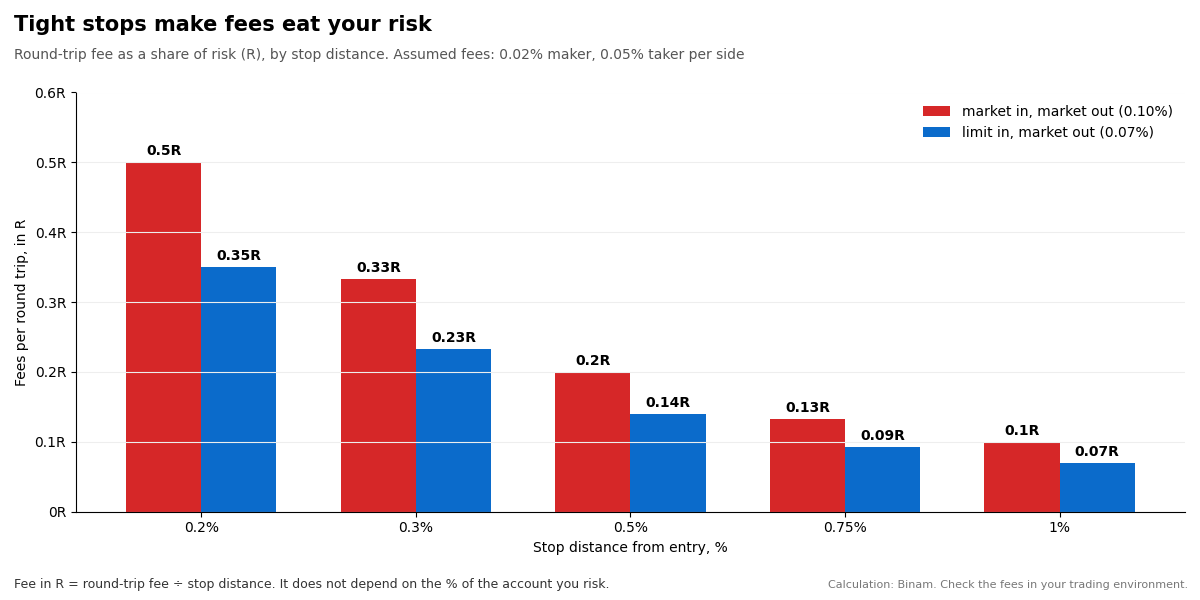
A fee looks small as a percentage of the position but large as a share of your risk. With assumed fees of 0.02% for limit orders and 0.05% for market orders per side, a market-in, market-out round trip costs about 0.10% of the position. With a 0.2% stop, that is half of your risk on every trade, win or lose. With a 0.5% stop, it is a fifth.
The share does not depend on how much of the account you risk, only on how wide the stop is. Two practical conclusions: enter with limit orders where you can, and do not make stops so tight that fees and slippage take most of each win. Fees in your challenge environment may differ, so check them.
Stop-loss in CScalp: how to keep each trade within the risk cap
- Set it right after entry. In CScalp, a stop-loss attaches to an open position: open the trade, then press C and click the stop price on the ladder. Make "enter, then stop" one motion.
- Keep it on the server. In the instrument settings, choose server-side placement for stops. A server-side stop triggers even if CScalp closes or the internet drops, and it executes as a market order, so expect some slippage in a thin book or on news.
- Move it only closer. A stop is moved by setting it again (C and click); a trailing stop is on N. Never widen a stop beyond your planned risk.
- Know the emergency keys. D closes the position at market and cancels limit orders; F cancels limit orders; Q stops running commands. Be careful with R, which reverses the position with double size.
Guard the daily limit
The daily loss limit counts closed and floating losses from the balance at the start of the day. A simple guard: decide on a personal stop for the day below the rule, for example 3% on a 4% limit, and stop trading when you reach it.
CScalp has a built-in risk manager that can block trading after a loss in dollars or as a percentage of the deposit, count open drawdown and stop you after a number of losing trades in a row. It cannot be switched off during the session once triggered. Check whether it works on your challenge connection; if it does, set it below the challenge limit.
Common mistakes on a scalping challenge
- No stop, or a stop "in your head". Nothing keeps the trade within the 3% risk cap.
- Risking 3% per trade. One or two losses end the day or the challenge.
- Overtrading. Dozens of trades, with fees taking a large share of risk on each, and tilt after a losing streak.
- Tight stops with market entries. Fees and slippage outweigh the edge.
- Stops kept in the app, not on the server, and a lost connection.
- Revenge trading. Raising size after a loss or reversing on emotion.
- Ignoring the five trading days and the 4% cap per trade. One big trade cannot finish the target alone.
- Technical setup. Running CScalp on a Mac without an emulator, or connecting with the wrong credentials.
Binance through CScalp or Bybit: what is the difference at Binam?
| Binance | Bybit | |
|---|---|---|
| How you connect | Demo account created automatically through CScalp; login and password | Your own Bybit demo sub-account and demo API keys, connected in the Binam dashboard |
| Terminals | CScalp only | Any platform that supports Bybit demo API keys, plus the Bybit interface |
| Mobile | No (CScalp is a Windows desktop app) | Yes, through the Bybit app |
| Best for | Scalpers who trade from the order book ladder | Traders who prefer the exchange interface or their own tools |
Source: Binam FAQ.
Frequently asked questions
Does Binance offer funded accounts or a prop program?
No. Binance offers demo trading for practice, but funding comes from prop firms. Binam lets you choose Binance as the exchange for its challenge and trade it in CScalp.
Which prop firms let you trade on Binance?
Few. Most crypto prop firms connect to Bybit, run their own platforms or use MT5, and some list Binance only as a payment method. Binam offers Binance futures through the CScalp terminal.
Can I trade the Binam Binance challenge on the Binance website?
No. Binam supports Binance challenges only through CScalp. You receive a login and password for a demo account that is created automatically through CScalp.
Is CScalp free, and does it work on a Mac?
CScalp is free. It runs on Windows x64 (Windows 10 or later); on a Mac it works only through an emulator such as Parallels.
How do I set a stop-loss in CScalp?
Open the position, press C and click the stop price on the order book ladder. Choose server-side placement in the instrument settings so the stop triggers even if your connection drops.
How much should I risk per trade on a Binance challenge?
The rule allows up to 3%, but on One-Step two 3% losses equal the 6% maximum loss. Most scalpers keep risk at 0.5 to 1% per trade and size the position from the stop distance.
Are bots and hotkeys allowed?
Hotkeys are a normal terminal feature. Binam's rules also allow bots and algorithmic strategies as long as every risk rule is respected.
Where to start
Read the challenge rules and the FAQ on exchanges and terminals, then practise the routine before the first trade: set working sizes, put stops on the server, and decide on your own daily stop below the limit. If you like to find setups first, our free crypto screener shows order book walls on Binance, Bybit and OKX; here is how to read them. For sizing, see the one-line position sizing formula.
Trading crypto futures involves risk. Challenges run on demo accounts with real quotes. This article is for information only and is not investment advice.